Timeline at a glance
Navigate a scalable Gantt, inspect extracted dates, follow dependency paths, and zoom the schedule without changing the source file.
 GanttPeek
Download on the App Store
GanttPeek
Download on the App Store
Your plan.
Minus the suite.
Open Microsoft Project .mpp, Primavera P6 .xer and .mpx schedules. Read the Gantt chart, then export or print it. Files stay on your device.

Actual GanttPeek screen showing a Primavera P6 schedule.
GanttPeek is built for people who receive schedules but do not need to author them. It opens the useful structure without the machinery of a full project-management suite.
Navigate a scalable Gantt, inspect extracted dates, follow dependency paths, and zoom the schedule without changing the source file.
Search the task hierarchy and inspect extracted dates, durations, predecessors, and successors. The built-in sample demonstrates additional interface fields.
Review extracted resource names, groups, and assignments. GanttPeek clearly marks capacity, rates, and allocation signals when the parser cannot extract them.
Export the Gantt chart as a multi-page PDF or a PNG image, or print it. A schedule report PDF and a task CSV are one click away. The original file remains untouched.
GanttPeek has no account, advertising SDK, analytics SDK, or cloud parser. The selected file is accessed through Apple’s file picker, processed locally in the app sandbox, and never uploaded.
Read the privacy policyFor MPP files, support is determined by the binary family stored in the file, not only the label on the Microsoft Project box. Primavera and exchange formats open alongside them.
Core extraction covers task names, dates, durations, hierarchy and dependencies, plus resource identities and basic assignments when present. Password-protected files are rejected. Baselines, progress, constraints, notes, real calendar exceptions, custom fields, resource capacity and costs, source critical-path flags, and some assignment details are not yet extracted and are called out inside the app. Exact Project 2021 vs 2024 vs Microsoft 365 origin cannot be distinguished because those editions share the Project 16.x / MPP14 family. Corpus acceptance confirms robust family handling; it does not mean every proprietary field is decoded.
Primavera XER and P6 XML show projects, WBS, activities, dates, durations, progress, constraints, relationships, resources, and assignments; calendars, costs, activity codes, notes, and steps are not read. MPX shows tasks, outline, dates, durations, progress, baselines, constraints, notes, links, resources, and assignments; costs, work, calendars, and custom fields are not read.
How to open an XER file on Mac explains the read-only workflow and its limits.
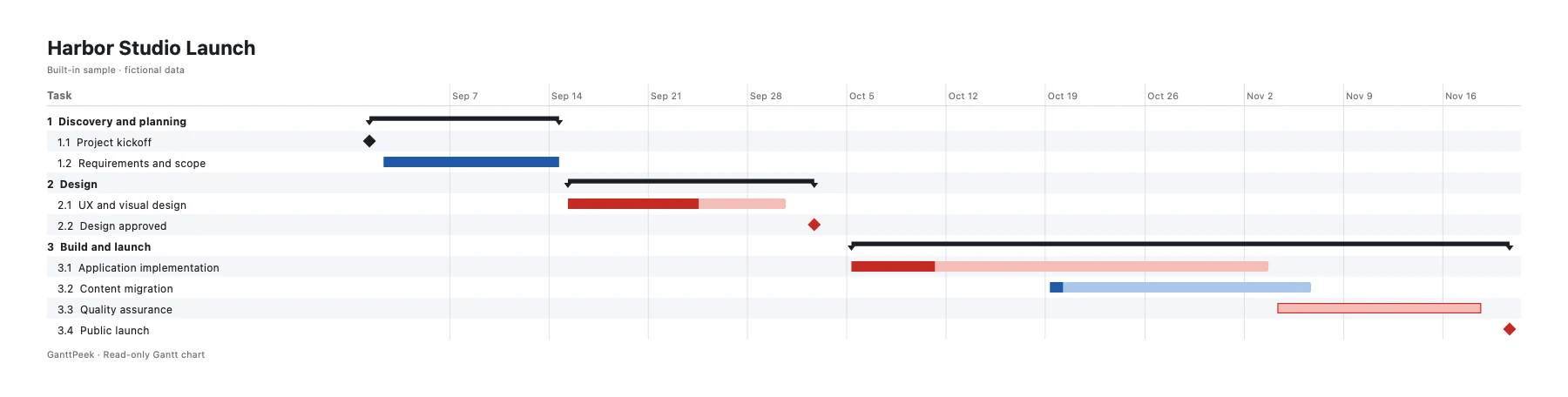
Every install includes Harbor Studio Launch, a fictional schedule designed to exercise tasks, milestones, dependencies, resources, calendars, progress, and exports.
Explore the built-in fictional schedule before opening your own file.
Download GanttPeek and open one real project at no charge. Reopen that same project whenever you need it, explore the built-in sample, and use every viewing and export tool.
Open and reopen one project, with the complete viewer and PDF/CSV exports.
Open unlimited projects with an optional monthly or yearly subscription, or a single Lifetime purchase. The App Store shows your local price before purchase. Subscriptions renew automatically until cancelled in your Apple Account. No account, and Family Sharing where Apple makes it available.
Already bought GanttPeek version 1.0? Lifetime access is enabled automatically after you update.
Install GanttPeek, choose Open Project or press ⌘O, and select an authorized MPP file. The schedule is processed locally and the source file remains unchanged.
Yes. Choose an MPP file from Apple’s document picker. GanttPeek parses it on your device without an account or cloud upload.
Yes. GanttPeek opens Primavera P6 .xer exports and P6 XML files, as well as Microsoft Project XML and .mpx files. Projects, WBS, activities, dates, durations, progress, constraints, relationships, resources, and assignments are shown. Primavera calendars, costs, activity codes, notes, and steps are not read.
Yes. Export the Gantt chart as a multi-page PDF or a PNG image, or print it, on Mac, iPhone, and iPad. On a Mac, press ⌘P to print. A schedule report PDF and a task CSV are also available.
No. It is intentionally read-only and never writes back to the selected MPP file.
No. Parsing happens locally in the app sandbox on Mac, iPhone, or iPad. GanttPeek has no upload service or analytics SDK.
You can open and reopen one real project, explore the built-in sample, and use the complete viewer and export tools. GanttPeek Pro unlocks unlimited projects across supported Apple devices, as an optional monthly or yearly subscription or a one-time Lifetime purchase.
No. Customers who bought GanttPeek before the free-download update receive Lifetime access automatically.
They share the modern Project 16.x / MPP14 family handled by GanttPeek, so this is family-level compatibility rather than edition-specific certification. Public acceptance files are producer-verified through Project 2019; dedicated 2021/2024/365 files are optional evidence before any stronger “tested with this exact edition” claim.
No. The current parser rejects password-protected MPP files with a clear message. GanttPeek does not recover unknown passwords or bypass protection.
No. GanttPeek is independently developed by Eutopix Labs and is not affiliated with, endorsed by, or sponsored by Microsoft.
GanttPeek 1.2 adds project notes, meeting minutes and action items beside the schedule, plus explicitly transferred Apple Watch snapshots.